Rails 在開發環境中啟用 HTTPS

本文原發表於 Medium,2026-10-27 搬移至此。

到底誰沒事會在開發環境用上 HTTPS

ssl on local

現今許多公司為了提升安全性,只提供服務給有 HTTPS 連線的網路應用程式,如 Facebook 登入:

Login Security - Facebook Login - Documentation - Facebook for Developers

使用 HTTPS

使用具有加密功能的 HTTPS 作為網際網路通訊協定,而非 HTTP。HTTPS 會維護傳送資料的隱私,保護其不受竊聽攻擊。此外,也能保護資料在傳送過程中不遭到置入廣告或惡意程式碼的竄改。

在 2018 年 10 月 6 日,所有應用程式都必須使用 HTTPS。

這也導致在開發或測試環境時常會因為開發環境沒有設置 SSL 而出錯,本例Facebook 中有兩種解法:

  1. 建立 development 與 production mode 兩種 Facebook 應用程式,development mode 下 Facebook 依然願意提供服務給開發者。
  2. 開發端使用 SSL

本篇文章將介紹比較省事的選項 2,讓你能夠以 https://localhost:3000 開發

設定 SSL

mkcert

使用 mkcert 自簽 cert,沒安裝者須先進行安裝:

1
2
3
4
$ brew install mkcert nss  
$ mkcert -install
Created a new local CA at "/Users/filippo/Library/Application Support/mkcert" 💥
The local CA is now installed in the system trust store! ⚡️

簽署憑證:

1
2
3
4
5
6
$ cd project  
$ mkcert localhost
Using the local CA at "/Users/username/Library/Application Support/mkcert" ✨
Created a new certificate valid for the following names 📜
- "localhost"
The certificate is at "./localhost.pem" and the key at "./localhost-key.pem" ✅

把憑證移到 config/ssl/下

1
2
$ mkdir config/ssl  
$ mv localhost-key.pem localhost.pem config/ssl

Rails configuration

在 config/puma.rb 中設定 SSL 服務:

1
2
3
4
5
6
7
8
9
10
11
# Remove  
port ENV.fetch("PORT") { 3000 }
environment ENV.fetch("RAILS_ENV") { "development" }
# Add
if ENV.fetch('RAILS_ENV') { 'development' } == 'development'
# using mkcert self-signed cert enable ssl
ssl_bind '0.0.0.0', ENV.fetch('PORT') { 3000 }, cert: 'config/ssl/localhost.pem', key: 'config/ssl/localhost-key.pem'
else
port ENV.fetch('PORT') { 3000 }
environment ENV.fetch('RAILS_ENV') { 'development' }
end

在 config/environments/development.rb 中強制所有連線使用 SSL 連線:

1
config.force_ssl = true

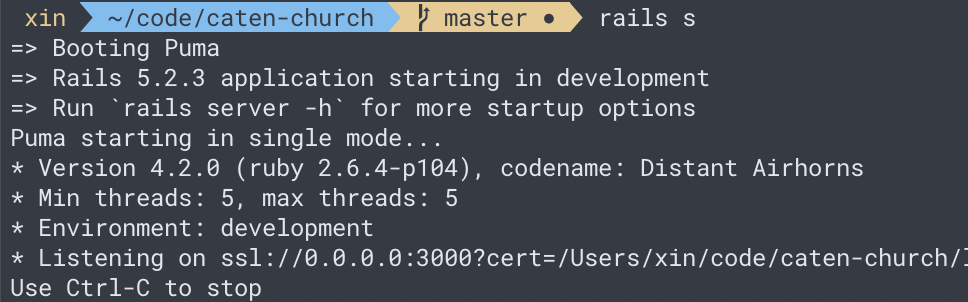
重啟 dev server,開始在開發環境上用 HTTPS 連線吧!

1
$ rails s

可能會遇到的問題

Puma 沒有使用正確的 SSL 設定

1
2
3
SSL error, peer: 127.0.0.1, peer cert: , #<Puma::MiniSSL::SSLError: OpenSSL error: error:141F7065:SSL routines:final_key_share:no suitable key share - 337604709>
# OR
HTTP parse error, malformed request (): #<Puma::HttpParserError: Invalid HTTP format, parsing fails.>

使用最新的 Puma(>4.2.0)。

無法從 webpack-dev-server 取得編譯後的 JavaScript

1
2
3
4
5
6
7
8
9
10
11
12
13
14
15
16
17
18
19
20
21
22
23
Failed to load resource: net::ERR_SSL_PROTOCOL_ERROR  
:3035/sockjs-node/info?t=1570436373828:1
# OR
GET https://localhost:3035/sockjs-node/info?t=1570436376957 net::ERR_SSL_PROTOCOL_ERROR
sockjs.js:1796
# OR
GET https://localhost:3000/packs/js/application-2be7c5d587f23021bfe9.js net::ERR_ABORTED 500 (Internal Server Error)
localhost/:10
# OR
Failed to load resource: the server responded with a status of 500 (Internal Server Error)
application-2be7c5d587f23021bfe9.js:1
# OR
Rack app error handling request { GET /packs/js/application-47a01f2c35f03c5131aa.js }
#<EOFError: end of file reached>
# OR
Puma caught this error: end of file reached (EOFError)
# OR
Failed to load resource: net::ERR_CERT_AUTHORITY_INVALID
:3035/sockjs-node/info?t=1570452520941:1
GET https://localhost:3035/sockjs-node/info?t=1570452524158 net::ERR_CERT_AUTHORITY_INVALID
# OR
Refused to connect to 'wss://localhost:3035/sockjs-node/661/ghika1m3/websocket' because it violates the following Content Security Policy directive: "connect-src 'self' https: http://localhost:3035 ws://localhost:3035".
sockjs.js:1887

webpack-dev-server 也要記得上 SSL,提供 https:// 與 wss:// 等連線方式。

如何在 Rails Webpacker 為 webpack-dev-server 設定 https 可以看看我的這篇文章:

Rails Webpacker 的 HTTPS 設定

References