本篇只是閱讀原文後的譯文
原文出處: https://blog.strongbrew.io/rxjs-best-practices-in-angular
前言
以 SendGrid 寄送 email 時,若無進行網域驗證,有些信箱會在寄件者後面帶上一個後綴提示使用者,這封 email 實際的寄送網域為何,因此會多一個透過 sendgrid.me的後綴 ,如

這表示寄件者與實際寄送 email 的網域不同,見 https://support.google.com/mail/answer/1311182
本文整理了系統環境變數、 git、curl、wget、npm、bundler、nuget、brew、apt 與 chocolatey 等多種下載工具的 proxy 設定。
前言
當公司有做網路控管時,對外的網路請求通常需要經由 proxy server 轉送,對內或 localhost 的可以不需要,要也沒關係就是要繞一圈比較慢。
接下來我們將用 http://proxy.company.com:80 這個 proxy server 為例,示範如何設置其他工具的 proxy。
本文原發表於 Medium,2026-10-27 搬移至此。
到底誰沒事會在開發環境用上 HTTPS Part 2

Rails 6.0 後 Webpacker 已經取代 Asset Pipeline成為預設的前端打包方案,安裝方法 Webpacker Github 上的 README 有很詳盡的說明:
上一篇文章中,介紹了如何在 Rails development 環境中使用 HTTPS 連線至 localhost server,並啟用 HSTS。
Rails 在開發環境中啟用 HTTPS此時用預設的 config/webpacker.yml 下去啟用 webpack-dev-server,其編譯後的 JavaScript 依然以 HTTP 提供。
但 Rails server 的 HSTS 設定會把
http://localhost:3000/packs/js/application-2be7c5d587f23021bfe9.js
轉換成請求
https://localhost:3000/packs/js/application-2be7c5d587f23021bfe9.js
這下就發生找不到資源的錯誤了:
1 | GET https://localhost:3000/packs/js/application-2be7c5d587f23021bfe9.js net::ERR_ABORTED 500 (Internal Server Error) |
webpack-dev-server
啟用 HTTPS
修改 config/webpacker.yml 將 development.dev_server.https 設為 true
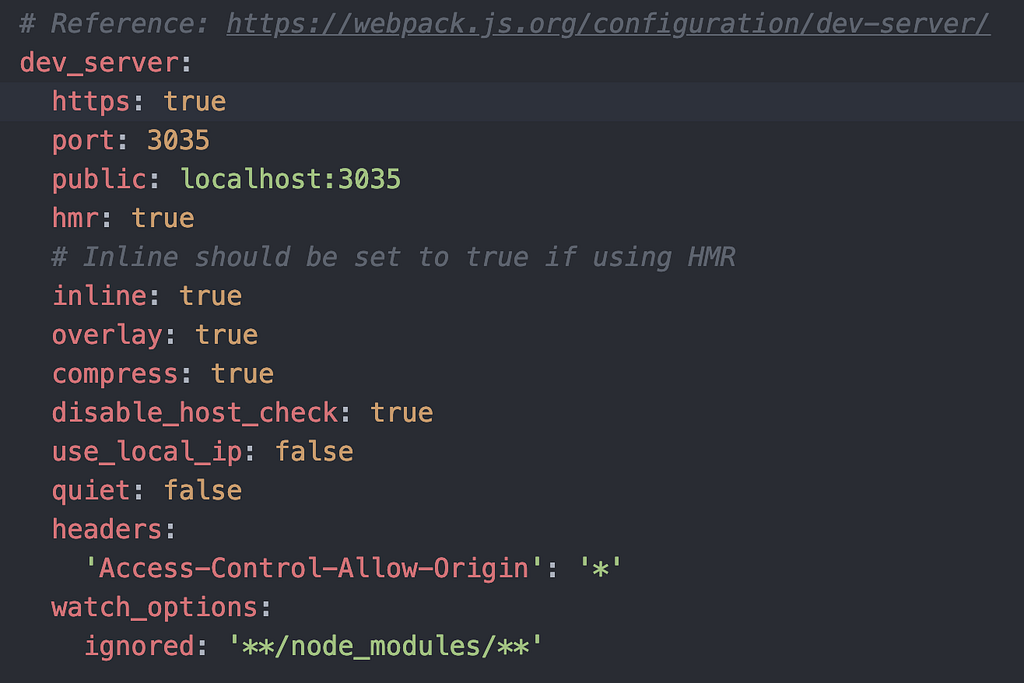
config/webpacker.yml
重啟 rails server 與 ./bin/webpacker-dev-server 後,還是錯的!
1 | # HTTPS 憑證錯誤 |
指定憑證
webpack-dev-server 指定憑證的方式可以看
在Rails 在開發環境中啟用 HTTPS我們將 mkcert 自簽的憑證放在 config/ssl/ 下,於是我們必須修改 config/webpacker.yml 指定 development.dev_server.https.cert 與 development.dev_server.https.key 使用憑證,如下:
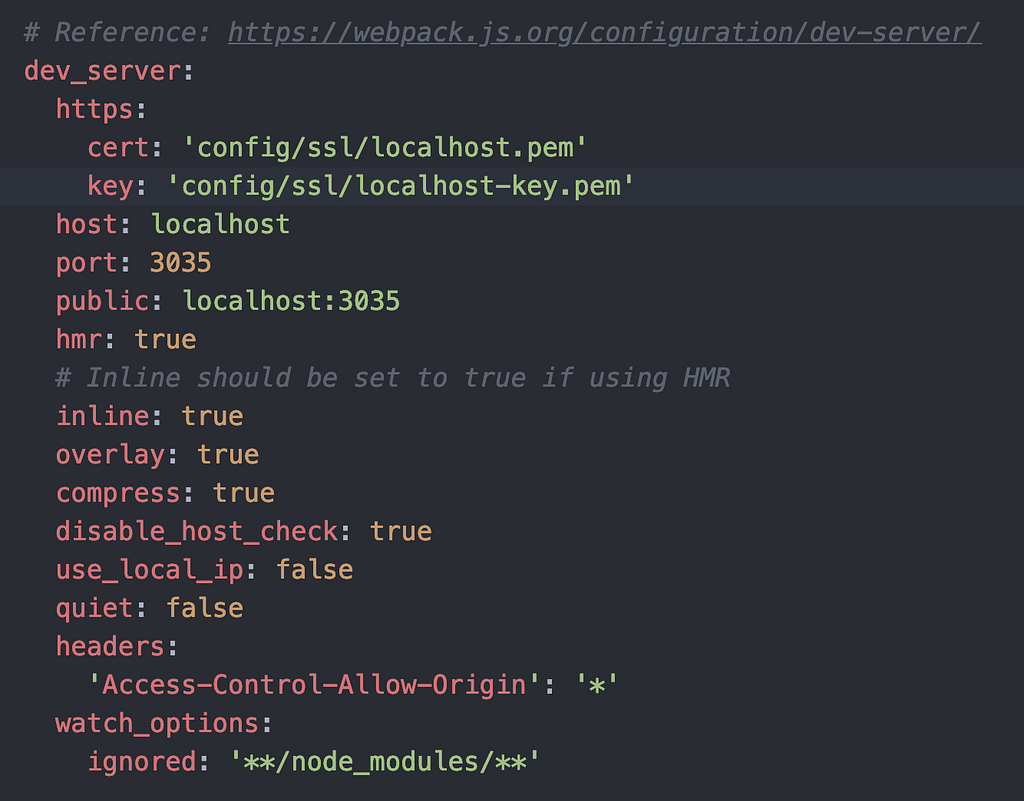
config/webpacker.yml
你以為成功了嗎?重啟 rails server 與 ./bin/webpacker-dev-server 後,還是錯的!
原因在於 4.0.7 版的 Webpacker 忽略了我們傳入的 https 參數,只 care 是否為 true。
./bin/webpack-dev-server command line arguments are ignored · Issue #2000 · rails/webpacker
直到這個 PR 才修正了這個錯誤。
coerce https yaml config to boolean by hwhelchel · Pull Request #2251 · rails/webpacker
因此,我們至少需要指定 Gem Webpacker 版本號到 commit d577bab 以後,直到 4.0.8 版釋出:
1 | # Gemfile |
bundle 安裝更新套件,重啟 rails server 與 ./bin/webpacker-dev-server 後,就能成功囉!
但如果你的 Content Security Policy 像我一樣設定錯誤,忘了加上 https:// 與 wss:// 的話,我只能說:「革命尚未成功,同志仍需努力。」
1 | # Content Security Policy 設定錯誤 |
設定 Content Security Policy
到 config/initializers/content_security_policy.rb 下
添加https://localhost:3035 與 wss://localhost:3035 到 policy.connect_src 中:
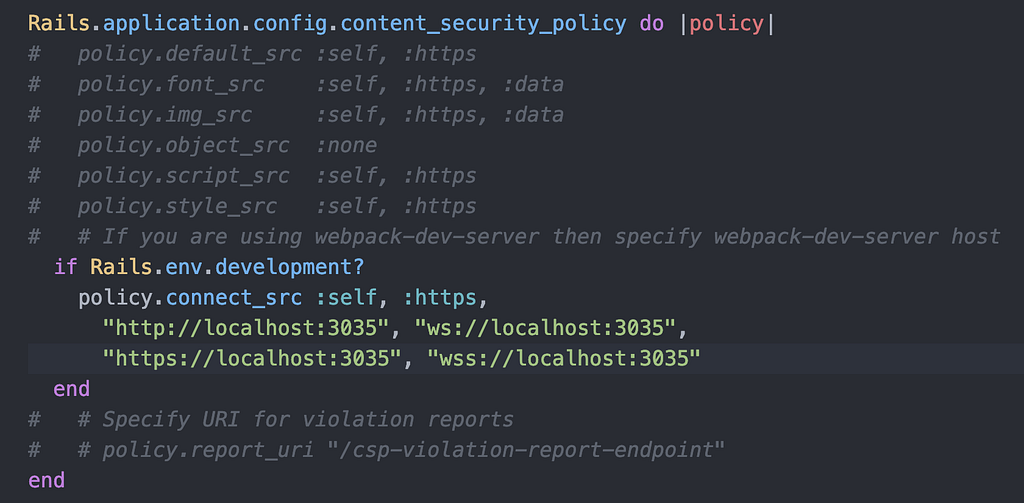
這下總算是成功在 development 環境下全面啟用 SSL 囉!
有人問我說為何我不直接把成功的設定分享給讀者,要帶著讀者一起錯過來,原因有三:
- 這樣讀者能夠理解是哪個部分導致錯誤
- 把常遇到的相關錯誤記錄下來,方便同踩此坑的兄弟們 Google
- 我花了 6 個小時 debug,你們直接過,我心裡不平衡啦
本文原發表於 Medium,2026-10-27 搬移至此。
到底誰沒事會在開發環境用上 HTTPS
ssl on local
現今許多公司為了提升安全性,只提供服務給有 HTTPS 連線的網路應用程式,如 Facebook 登入:
Login Security - Facebook Login - Documentation - Facebook for Developers
使用 HTTPS
使用具有加密功能的 HTTPS 作為網際網路通訊協定,而非 HTTP。HTTPS 會維護傳送資料的隱私,保護其不受竊聽攻擊。此外,也能保護資料在傳送過程中不遭到置入廣告或惡意程式碼的竄改。
在 2018 年 10 月 6 日,所有應用程式都必須使用 HTTPS。
這也導致在開發或測試環境時常會因為開發環境沒有設置 SSL 而出錯,本例Facebook 中有兩種解法:
- 建立 development 與 production mode 兩種 Facebook 應用程式,development mode 下 Facebook 依然願意提供服務給開發者。
- 開發端使用 SSL
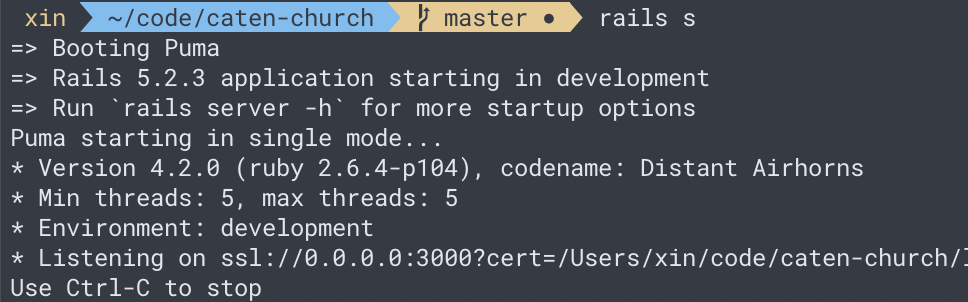
本篇文章將介紹比較省事的選項 2,讓你能夠以 https://localhost:3000 開發
設定 SSL
mkcert
使用 mkcert 自簽 cert,沒安裝者須先進行安裝:
1 | $ brew install mkcert nss |
簽署憑證:
1 | $ cd project |
把憑證移到 config/ssl/下
1 | $ mkdir config/ssl |
Rails configuration
在 config/puma.rb 中設定 SSL 服務:
1 | # Remove |
在 config/environments/development.rb 中強制所有連線使用 SSL 連線:
1 | config.force_ssl = true |
重啟 dev server,開始在開發環境上用 HTTPS 連線吧!
1 | $ rails s |
可能會遇到的問題
Puma 沒有使用正確的 SSL 設定
1 | SSL error, peer: 127.0.0.1, peer cert: , #<Puma::MiniSSL::SSLError: OpenSSL error: error:141F7065:SSL routines:final_key_share:no suitable key share - 337604709> |
使用最新的 Puma(>4.2.0)。
無法從 webpack-dev-server 取得編譯後的 JavaScript
1 | Failed to load resource: net::ERR_SSL_PROTOCOL_ERROR |
webpack-dev-server 也要記得上 SSL,提供 https:// 與 wss:// 等連線方式。
如何在 Rails Webpacker 為 webpack-dev-server 設定 https 可以看看我的這篇文章:
Rails Webpacker 的 HTTPS 設定References
本文原發表於 Medium,2026-10-27 搬移至此。
Thank you my old pal!



MacBook Air 13” 2013 -> MacBook Pro 13” 2019
完成交接儀式後,起手式先安裝套件管理工具 brew:
1 | /usr/bin/ruby -e "$(curl -fsSL https://raw.githubusercontent.com/Homebrew/install/master/install)" |
常用軟體
可透過 brew 安裝的有:
1 | brew cask install google-chrome iina spotify telegram-desktop |
剩下的得自行安裝:
終端機
iTerm2 + oh-my-zsh
iTerm2
1 | brew cask install iterm2 |
下載配色:
1 | git clone https://github.com/mbadolato/iTerm2-Color-Schemes.git |
至 Preferences > Profiles > Colors > Color Presets… > Import
選擇剛 clone 下來的 iTerm2-Color-Schemes/schemas/OneHalfDark.itermcolors 當作配色方案。
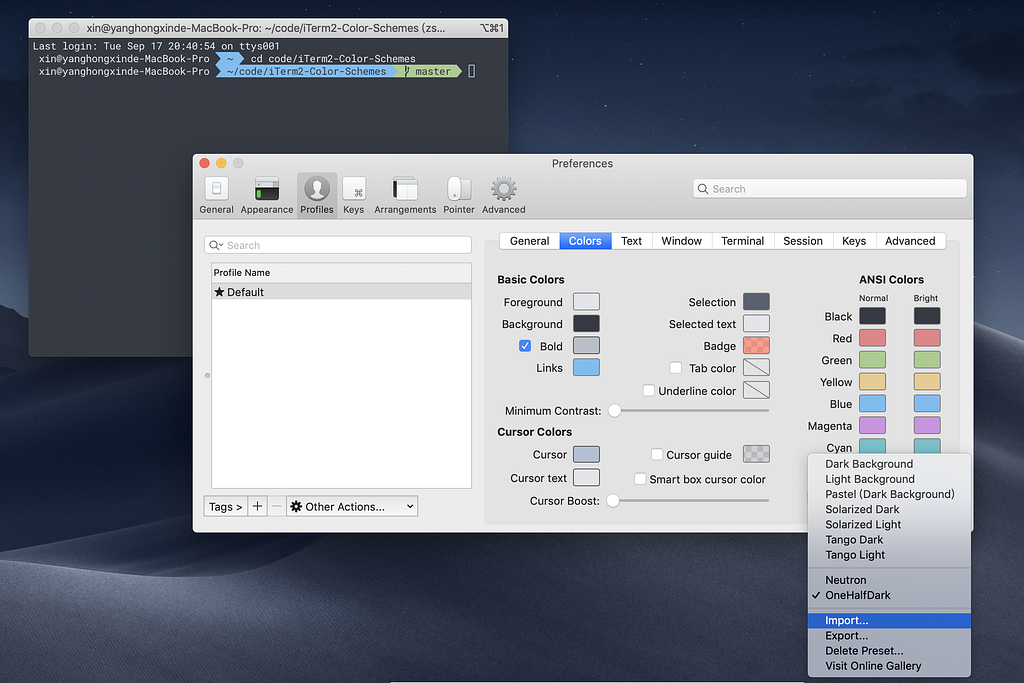
下載字型 :
1 | # 新增來源 |
至 Preferences > Profiles > Text
將 Font 與 Non-ASCII Font 設為RobotoMono Nerd Font
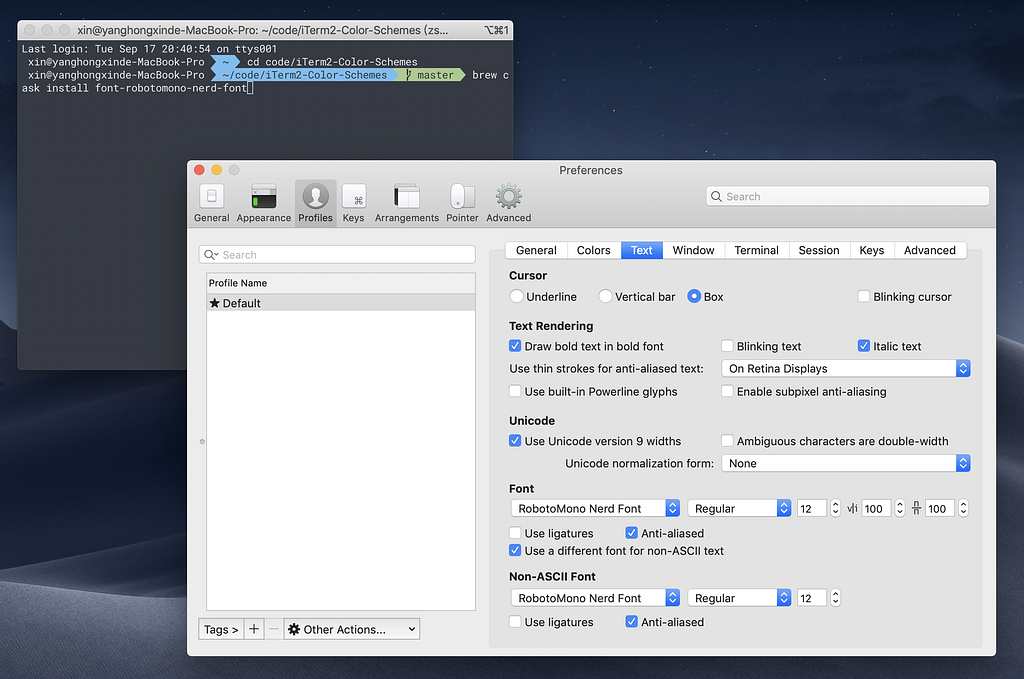
oh-my-zsh
1 | sh -c "$(curl -fsSL https://raw.githubusercontent.com/robbyrussell/oh-my-zsh/master/tools/install.sh)" |
powerlevel9k
1 | git clone https://github.com/bhilburn/powerlevel9k.git ~/.oh-my-zsh/custom/themes/powerlevel9k |
開啟.zshrc文件設定 theme 為 powerlevel9k/powerlevel9k :
1 | ZSH_THEME="powerlevel9k/powerlevel9k" |
編輯器
Atom
1 | brew cask install atom |
函式庫
系統函式庫
1 | brew install git pkg-config gnupg node yarn python3 mkcert postgres redis |
Ruby
使用 RVM 管理多版本 Ruby
1 | # 確認憑證 |
安裝 Ruby
1 | # 列出所有 ruby 版本 |
記一次 Boot Menu 找不到 Windows Boot Manager
本文原發表於 Medium,2026-10-27 搬移至此。
記一次中秋節大家在烤肉 😭,我關在 lab 修電腦 😭

Photo by Danny Gallegos on Unsplash
應教授所託將 dcard-crawler 安裝在 lab 的電腦上,於是我在這台原本就已經安裝好 Windows 10 的電腦上安裝 Ubuntu 18.04 作為第二個作業系統。
做好 USB 開機碟,分割完磁碟,安裝 Ubuntu,但不知為何安裝失敗:
1 | The 'grub-efi-amd64-signed' package failed to install into / target/. Without the GRUB boot loader, the installed system will not boot. |
重開機打算再用開機碟安裝一次時,系統卻出現錯誤訊息:
1 | Failed to open \EFI\BOOT\mmx64.efi - Not Found |
搜尋到這篇文章,成功解決問題,再來安裝一次還是失敗了。
此時回到 BIOS 中的 Boot Menu 中,我發現 硬碟(Windows) 的選項消失了,取而代之的是硬碟的 Boot 選項,透過這個硬碟選項 Boot 只能進入 BIOS,無窮迴圈。
照著這篇文章的做法:
1 | bootrec /fixmbr |
還是遇到問題:
- bootrec /fixboot 系統存取被拒。
- bootrec /rebuildbcd 有找到 C 槽中的 Win 10,但找不到要求的系統裝置。
最終跟著這篇:
bcdboot c:\windows /s c:終於成功建立的開機檔案。
今天中秋節,本來想說很快就能搞定,所以女朋友就跟來 lab 看我灌,結果一個悲劇 Ubuntu 18.04 沒灌成功,連眾多資料的 Windows 10 都無法開機,HDD 重開機跟安裝作業系統真的慢到一個靠腰,搞了 9 個小時才救回 Windows BCD(對女友感到非常的抱歉),絕望到想跑路。
拖了好久,終於有時間幫 彈幕教室 chatbot 裝個圖文選單啦,照著 官方教學 做其實就沒問題囉,但還是把實作的過程紀錄下來備忘。
順便打個廣告 https://github.com/danmu-classroom/danmu-classroom-screen,彈幕教室客戶端,下載即用免安裝,可以透過 Line 發送彈幕到螢幕上,歡迎來玩看看喔。

我的 rich menu 長這樣
Google 的自然語言處理雖然非常的強大,但是中文的情緒分析並非他的強項,目前中文的自然語言處理研究出處非常多是出於中國大陸,所以當需要用到中文的情緒分析時, 百度 AI 開放平台 就成為我們的首選啦。
平台目前的收費非常的便宜,例如本次介紹的 情感傾向分析接口,提供了 5QPS 免費額度,每秒免費請求 5 次超佛心的啊!根本就相當於不用錢。
注意!要註冊百度帳號必須要有 +86 開頭的中國手機門號喔。
使用百度 AI 開放平台的情緒分析服務很簡單,步驟就 4 個。
- 註冊帳號
- 創建 自然語言處理 應用
- 獲取
access_token - 使用 情感傾向分析接口
Network graphing in JavaScript - force-graph
分析網路關係,並將資料視覺化,最常見的就是 network graph。
常見套件
- https://github.com/vasturiano/3d-force-graph
本文主角,支援 3D 與圖互動。 - https://github.com/vasturiano/force-graph
本文主角,支援與圖互動。 - https://github.com/jacomyal/sigma.js
文檔寫在程式碼與範例中,需要參考它的範例原始碼。將圖展開可以使用它提供的 plugin forceAtlas2,與圖互動需要自己 coding 擴充。 - https://github.com/cytoscape/cytoscape.js
提供許多範例可以參考。 - https://github.com/almende/vis
不只做 network graph,可上官網參考範例。 - https://github.com/davidpiegza/Graph-Visualization
支援 3D,文檔並不齊全,需要參考它的範例原始碼